
How to Use the Background Removal Tool in Supacolor's Gang Sheet Builder
Sergio RamirezMarch 10, 2026
If your artwork file has a white, colored, or any other background behind the design, it needs to be removed before printing. Printing a transfer with a background included means that background becomes part of the transfer — and that's not what you want pressed onto your garment.

Supacolor's Gang Sheet Builder includes a one-click background removal tool that handles this instantly, without needing to open Photoshop or any external software.
Here's how it works:
STEP 1: UPLOAD YOUR ART AND PLACE IT ON THE GANG SHEET
Upload the image file that contains a background and add it to your gang sheet as you normally would.

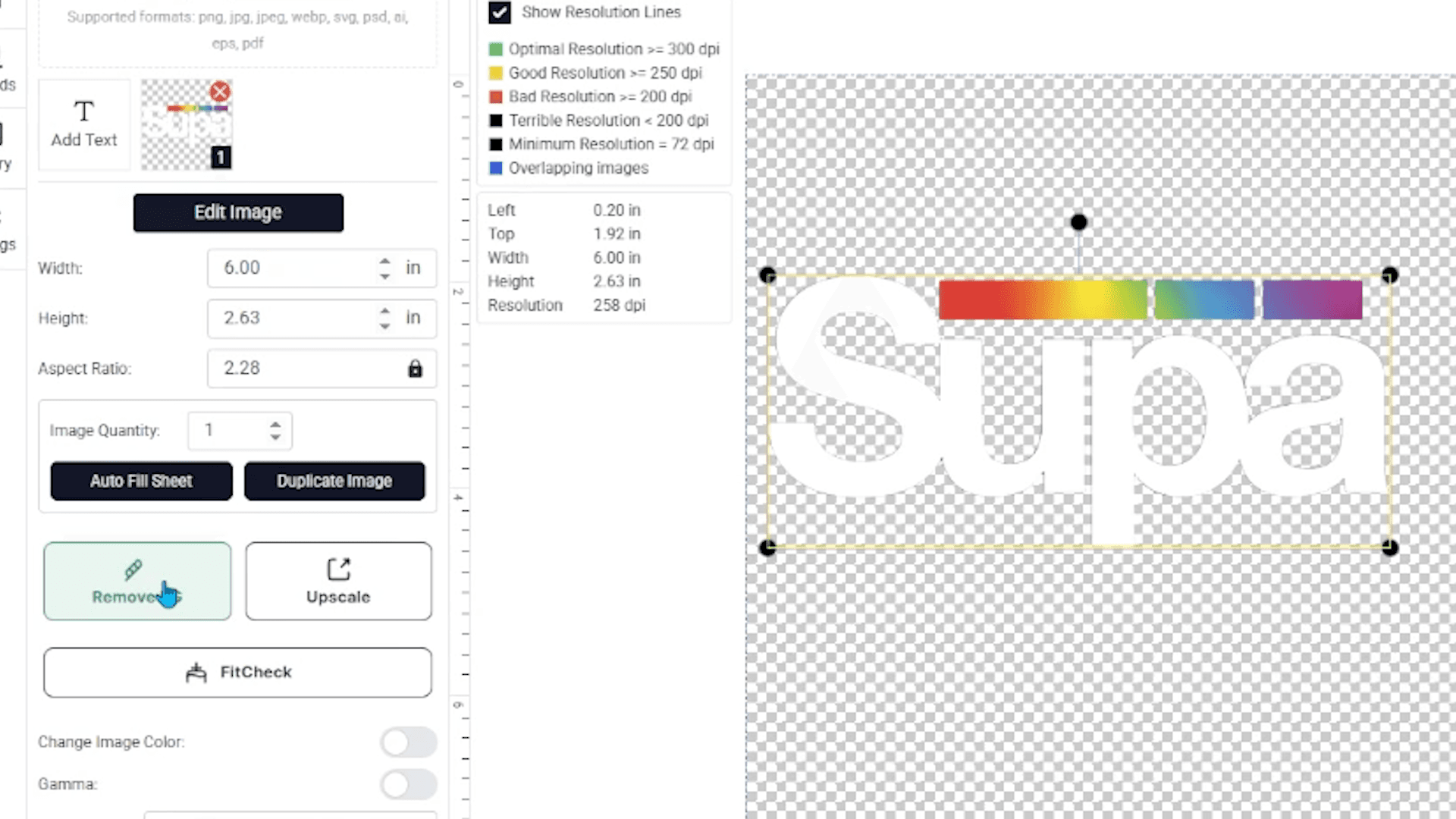
STEP 2: SELECT THE IMAGE AND CLICK "REMOVE B.G."
With the image selected on the gang sheet, click the "Remove B.G." option in the left panel.

STEP 3: DONE
That's it. The background is removed instantly, leaving only your design as a free-floating element on the gang sheet — ready for print.

No extra steps. No back-and-forth with an art file. The tool handles even complex backgrounds automatically, so you can keep building your sheet without breaking your workflow.
A NOTE ON COMPLEX BACKGROUNDS
For most artwork, the one-click removal works cleanly. If your design has intricate edges or areas where the background and design colors are very similar, check the result after removal and make sure the edges look clean before submitting.
Ready to give it a try?
Wholesale Business Accounts: Click here to log in to your Supacolor wholesale account.
Personal Accounts: Click here to shop all gang sheets in our online store open to the public.
Have additional questions about preparing your gang sheet? Our team is always happy to help. Email [email protected] or reach us at 844-973-2862.